Right on the Money: Epicor Prophet 21 for Rebate Management
Achieving profitability through distribution management software has never been easier. With the technology available in Epicor’s Prophet 21, automation can quickly optimize workflow across the distribution spectrum. In the critical area of rebate management, Prophet 21 rebate management modernizes supplier administrationby streamlining the process of tracking and collecting. This, in turn, minimizes administrative costs and maximizes overall profitability for your business.
Prophet 21 Leaves No Money on the Table
With Mardi Gras upon us, if you were a Mississippi gambler playing your odds on one of the French Quarter’s finest felts, you’d want to maximize whatever deals were available—without showing your cards prematurely or leaving any money on the table. In a similar shake, the key to successful rebate management lies in the ability to define a robust set of conditions basedon varying supplier parameters. This allowsfor automated downstream processing and transactional accuracy. This minimizes the internal costs of administering rebates, while maximizing those available. Prophet 21’s vendor rebates support a similar strategy of capitalizing on what’s available, leaving no money on the vendor’s proverbial felt.
Prophet 21 Makes Payables Playable
Because Prophet 21 is a highly configurable application, it can meet the needs of a variety of different vendor scenarios. Setup for rebates begins with the overall system settings. The System Settings form allows users to configure enhanced rebate functionality. Under the general settings within the Account Payable business area, “Enhanced rebate functionality” can be enabled. This sets the stage for further downstream system configuration.
Financial settings are made at the company level, where default general ledger accounts for rebates and rebate allowances are defined. Subsequent settings occur at the vendor and customer levels. Prophet 21 rebate tracking can be enabled for individual vendors—and this allows P-21 users to differentiate between rebate-applicable and non-rebate-applicable suppliers. Further settings at vendorlevel enable the user to override the rebate and the rebate allowance accounts defined at the company.At the vendor level, rebate variance-handling settings can also be defined. At the customer level, the default rebate location can be optionally defined.
The jackpot of P-21’s automated rebate functionality resides within the Sales Pricing pages. A number of possible rebate methods can be defined within these screens, including the following:
The Value Method: This specifies a cost-after-rebate value, which is subsequently compared to the base cost at the time of invoicingto determine a rebate amount.
The Multiplier Method: This allows you to specify your costs as a percentage of the primary supplier cost, with the remaining value at time of invoicing resulting in your rebate.
The Flat Method: This allows for a flat rebate amount to be placed against the supplier cost.
When automated rebate capture is not possible, you can determine manual rebates through Prophet 21’s Manual Rebate Entry screen. For payments, P21 supports check and debit memos, which are applied with the AP module as if they were cash receipts. Beyond automated and manual rebates, Prophet 21’s EDI solution supports outgoing rebate requests to vendors and incoming rebate payments from them. And in the event that a rebate needs to be reversed, the Rebate Reversals screen allows you to completely reverse the original posting.
Prophet 21 Means You Don’t Have to Gamble to Grow
Epicor Software Corporation has a strong reputation for providing powerful functionality for the distributionindustry. With real-time tracking and optimal automation, Prophet 21 immediately boosts profitability and enables further success by bringing cloud and e-commerce technology to any distributor looking to grow or transform business. With fast implementation at minimal investment, Prophet 21 ERP allows you to keep your purse strings tight and leave no money on the table, especially when deployed through P21 managed hosting in EstesCloud.
ERP! ERP! How do I love thee? Let me count the ways!
I’ve often remarked that the best way to get a company to fall in love with their legacy ERP (Enterprise Resource Planning) system is to implement a new one. When I was a customer, we moved from one of Baan’s flagship products to Epicor’s Vantage 803. ERP implementation is an exercise in nostalgia… With uh or ah or awe, does anyone out there remember Baan, or Vantage, for that matter?
I do remember the end user community at cutover: “Well, back in the Baan days we could do this, and we could that, and oh, I miss the Baan days…”— Folks who had never had a good thing to say about their enterprise system were suddenly swooning over it, now that it was on the outs.
Having heard nothing but complaints about our legacy ERP up until cutover, I didn’t know what to tell them. At a loss for words, I found myself quoting Lord Alfred Tennyson: “’Tis better to have loved and lost than never to have loved at all.”
I soon discovered that most end users in your average manufacturing company are not especially fond of nineteenth century British Romanticism, especially at cutover weekend.
Most companies don’t exactly love their ERP systems, even in a friendlies sort of way. I knew one fellow who had the source code of his ERP heavily modified to suit his exact needs. Of course, he loved his ERP—every time he used it, he was looking in a mirror.
For the rest of us, ERP is more like finding a roommate rather than a soulmate.
Integrated analytics, to provide operational metrics and KPIs.
In this series, we will further expound on the core capabilities mentioned above, and work to explain how these capabilities distinguish Epicor E10 from its competitors.
Companies in the midst of a software selection cycle are looking for things to love about a given system—things that will differentiate an ERP system from its competitors and that will ultimately help raise the business to greater levels of performance. With the New Year moving right along and Valentine’s Day on the horizon, are you ready to love your ERP in 2020 style? Whether you’re looking for some new Epicor E10 roomies or looking for someone to draw hearts around a new flame of a system, the EstesGroup team is ready to help you love the ERP you’re with.
Interested in learning more about Epicor ERP 10 customizations and how good consultants can help manufacturing companies? Give us a call.
Inventory. That word can hold a lot of different meanings for manufacturing companies. Production Personnel see it as the ingredients for making their products. Supply Chain Professionals base much of their career on it. Accountants see it a major corporate cost. Executives see it as both an expense and potential sales.
All of these views are correct and each hold merit. Without inventory, parts can’t be built. Without parts to sell, companies can’t grow. As Inventory can represent a significant expense, managing these costs efficiently can increase the bottom line and offer significant competitive advantages.
The key to an optimized inventory is only buying what you need, when you need it. While simple in concept, the execution can be very, very difficult. For those manufacturing companies that manufacture products with a deep Bill of Material, managing the what and when of raw materials can become a monumental undertaking.
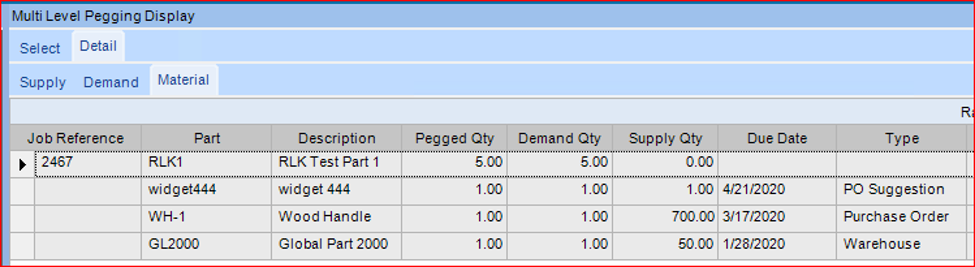
It is that very example that Epicor can provide a powerful tool with their Multi-Level Pegging Process. Going beyond just looking at the material demands of the top-level assembly, the multi-level pegging process will calculate the material needs of all of the indented bill-of-materials on a job. Have a part that takes a manufactured sub-assembly, and that sub-assembly takes another sub-assembly to make it? The Multi-level pegging process will capture all of those materials demands. And Epicor displays all the pertinent information regarding those materials on their built-in Multi-level Pegging Dashboard.
Strategic information such as the quantities needed, and material status is provided in an easy-to-read format. Additional details such as is the material currently available, is it on order, or has it been generated are also displayed.
For those companies wishing to optimize their inventory, having the materials at the right quantities at the right time, the Epicor Multi-Level Pegging process provides a powerful tool for manufacturing and material professionals to achieve that lofty goal.
This functionality is only part of what the Multi-Level Pegging process can do for your company. Talk to us to learn more tricks.
Do you have questions about Multi-Level Pegging and Supply Chain Management? Let us know, Contact Us Today.
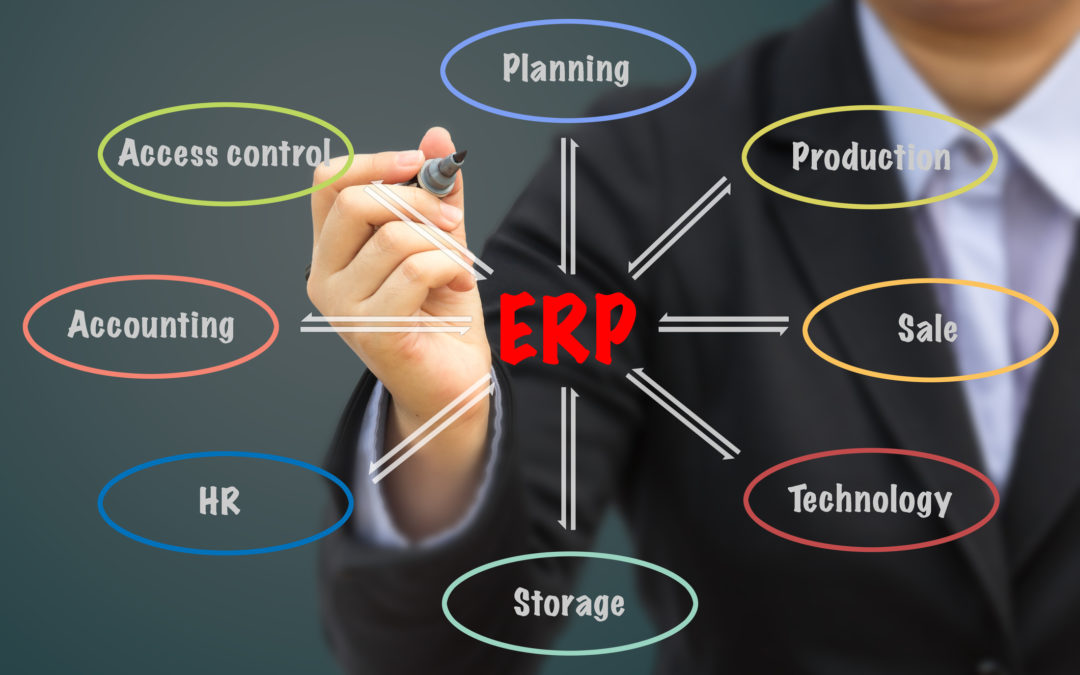
Businesses who are happy with the money they’re making and don’t wish to grow or to improve their relationships with their customers often don’t think about the need for ERP software. However, those businesses are few and far between. For the rest of us, the need for streamlined business processes has never been greater. ERP software helps businesses remain competitive by providing tools necessary for operating efficiently.
Why Do We Need an ERP System?
Gone are the days of companies have an employee or a department specifically devoted to manually entering information. Gone are the days when customers only had one choice when it came time to order the products they need. Today’s business processes must be done quicker and more efficiently than ever in order for a company to keep pace with its customers’ demands. An ERP package helps you to provide quick, accurate, and efficient service to your customers by providing a centralized hub in which all of the data from the various departments is managed.
The following symptoms show that your business is ready for an ERP package:
You’ve outgrown your business software and it is no longer capable of doing all of the things you need it to do.
Your existing business processes often result in missed deadlines, wasted materials, unused machines or labor, and other inefficiencies.
You need to track data across existing systems or in multiple departments and you’re unable to do so.
You don’t have the transparency you need in all aspects of your business to make informed decisions as to future opportunities.
Your employees are often tied up with tasks that could be automated.
There is little communication or information sharing between the various groups in your organization.
You’re spending too much on licensing fees, staffing, training, operations, and labor all for the sole purpose of integrating multiple applications.
Should Every Business Buy an ERP Package?
The simple answer to this question is: Yes. While small to medium businesses may be able to get by on a patchwork of different software, multiple systems are less effective for your business processes as they quickly become outdated and also require a lot of manual and duplicate entries. ERP systems streamline the various processes you use in your day-to-day operations, working off the same, shared database. This not only gives you a complete view of all of your processes and how they relate to one another, but also improve collaboration and provide you with the analysis you need to make decisions that will impact your bottom line.
Additional reasons why every business should buy an ERP package include:
Automated management of business tasks which free up employee time for other critical work.
Reducing errors that come with manual entry, saving your company’s precious resources, including money and time.
Increased productivity due to real-time coordination between groups within your organization.
Creation of a clear audit paper trail that can withstand the compliance regulations of your industry.
Reduction of labor costs and IT expenses.
Improving customer relationship management by allowing your sales department to have the information they need about the customers they deal with and the information they need to know about inventory and availability.
Flexibility to handle organizational growth and its impacts to each individual department.
Knowing that your software is up-to-date, secure, and maintained and that there is support available if you should have any questions.
We Can Help
EstesGroup is the leading consultancy for enterprise resource planning and Epicor products, including Epicor Kinetic ERP and Prophet 21. We also provide ERP consultations for SYSPRO and Sage ERP, and we provide the highest level of help to your team regardless of what system you select for your business. We will not guide you toward our own products if they are not a good fit for you. Contact us today for a free, in-depth consultation so that we may discuss your business processes with you and find a solution that will advance your company’s initiatives.
Are you looking for an ERP system, or do you have questions about what ERP is best for your business?
To Rent or To Buy – More and More Often, It’s To Rent.
In some ways distribution has not changed over the past 50 years; but in other ways it really has morphed – I know, that statement was non-committal. But take for example product Rental Management. Your customers still want your fantastic product whether that’s cars, industrial equipment, cylinders, furniture, etc. and there is a paper trail to track those rentals and bill appropriately. Unfortunately not many Enterprise Resource Planning (ERP) systems easily track rental products so distributors are forced to look for standalone products and old fashioned paper trails – either way, creating a lot of work arounds or duplication efforts for a company. Epicor recently released a new application for distributors, and I for one, am extremely excited about it.
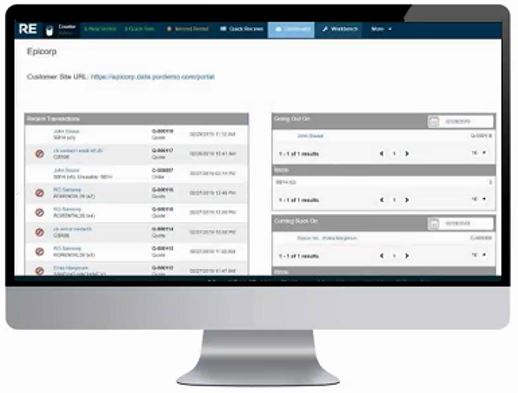
The new Epicor Rentals Management (ERM) solution makes tracking rentals within the Epicor Prophet 21 ERP (P21) simpler and more efficient. ERM handles the actual rental transaction while the P21 application holds all other data like customers, items, accounting, inventory, etc.
P21 Rental Management Tracking
Some of the primary benefits of Epicor P21 Rental Management (ERM) are:
Efficient Rental Transaction Processing
Manages Scheduling and Assignment Processes
Flexibility in Pricing Rental Designs
Flexibility in Product rentals for day, week, month, mileage, hours used, etc.
Simplified contract maintenance
Automatic Rental Billing
Rental Availability
What is really nice about the ERM module is that when your customer service or sales team goes to enter in a new rental order, the process is just like any other order in P21 – using the Order Entry Window. With everything setup, the sales associate just enters in the a rental item and P21 switches the order to a Rental Order vs standard Sales Order. Switching to a Rental Order will cause the ERM module to open up and finish the rental processing; with information like state, dates, duration, even serial and lot tracking information.
A few of my favorites I’ve seen so far are:
Simplified Contract Maintenance
Contracts. Need I say much more before the room starts to groan? Usually contracts are done on paper – sometimes with carbon copies – though often times it’s a matter or printing, signing, and scanning. Thankfully ERM has helped simplify that painful (and let’s face it) rather wasteful process. Within ERM the sales agent can input the data, customer can review the contract and sign for it – making the entire process much simpler. This allows the final contract to be stored electronically with ease, or print or email once finished.
Automatic Rental Billing
The Finance department is going to love this feature. No more grabbing that monthly billing folder / file cabinet / or excel list with customer names and billing frequencies. ERM has automated rental billing which allows finance to set billing intervals and then generate the invoices according to your business schedule.
Tracking
Every one loves tracking – dashboards, look up, quick reference, you name it. Having the ability to quickly find the data you need when the customer needs it. The ERM module makes it easy to see rentals by customer, rental product type, etc.
Let’s face it, at the end of the day, being a rental business is hard work. Unlike most manufacturers and non-rental distributors – who have little need to track their products once the item has shipped – you need to know who, where, how long, at what price, etc. and then rinse-and-repeat for the next customer. Epicor’s Prophet 21 Rental Management solution solves a large functionality gap for distributors.
To end this on a light note; I recently heard a funny rental joke:
Why was the mole’s rental fee so costly?
Because he burrowed and never returned
Questions or feedback on this article? Wanting more information on Prophet 21 ERP or P21 Rental Management? Let us know.
If you asked your IT personnel what the advantages of implementing an Enterprise Resource Planning (ERP) system, in all likelihood, they’d tell you that it could be revolutionary or absolutely destructive depending on their past experiences. The key to making it revolutionary revolves around partnering with experienced ERP consultants who know how to implement and manage an ERP system on-time, on-budget, within the scope described to you during the initial phases of the implementation.
Below you will find some of the reasons why implementing an ERP system like Epicor ERP, can be revolutionary.
Increased Productivity
Implementing an ERP system streamlines and automates your business processes improving productivity and organization. This dramatically reduces the time spent on business tasks such as manual entry, tracking time sheets, generating reports, and the time spent trying to fix problems related to using multiple platforms across multiple departments. Because an ERP aggregates data into a single database, you are able to tie information across every department to gain meaningful insights in real-time and automate reporting so that your company’s internal resources can be leveraged for analyzing that information rather than collecting it.
Happier Customers
With the advent of online shopping and services, competition has never been stiffer for businesses. If you don’t keep your customers happy, another company will. Customers who are able to get their questions answered quickly and without much effort are happier customers. This is why implementing an ERP system is important. It not only provides you with instant access to a customer’s ordering history and information, but it also allows greater interaction between you and your suppliers as well as you and your customers. By using the Customer Relations Management (CRM) , customer data can be accessed across business operations, so you’re not only able to better handle the needs and concerns of your customers, but also use the information gleaned from customer order history to refine your sales strategy and improve lead generation.
Increased Mobility
Work is no longer just something that takes place in an office. Today, people are working while on vacation. They’re working from home. They’re working anywhere that life takes them. The Epicor ERP system is mobile-friendly, meaning that you and your employees are able to access important information and continue to contribute in even the most remote places in the world (so long as they have an internet connection, that is).
Regulatory Compliance
Still wondering why you should implement an ERP system at your company? An important factor in a powerful ERP solution is that it can track regulations within your industry and alert you when there are regulatory changes, ensuring that you stay in compliance without stress. While this is helpful at the local level, it is particularly important for businesses with a global reach and varying regulations in the countries where they do business. Additionally, the ERP’s auditing tools provide documentation and generate reports so that you can easily show your compliance to any governing authority that asks.
Reduces Disconnect
Multiple platforms can provide conflicting information and often result in single departments working in a bubble, even though they may be largely dependent upon other departments for important information. This not only creates a disconnect between your departments, but can also result in decreased productivity and time-consuming errors. An ERP system places all of your departments in the same room, with the same access to information and a built-in accuracy that cannot be found in traditional business methods.
Scalability
Businesses require customization within their systems. They grow, they shrink, and their needs change. Epicor ERP provides you with that level of flexibility by incorporating lean manufacturing tools that enable operational best practices.
Not to mention, your ERP solution should scale as well. The team of software engineers at Epicor are constantly updating their systems to address new problems that never existed before, so that all of their customers receive exactly what they need.
Customized Reporting
Reports are necessary for a variety of reasons, and your ERP system uses information stored in the centralized database to generate professional reports for any business reason you may have. Your employees can easily access analytics data needed for the report without help from IT. These are just some of the benefits of an ERP system. For more information about how you can implement an ERP within your company, contact EstesGroup today!
Do you have a specific question or interested in learning more about Enterprise Resource Planning (ERP) systems? Talk to us!
Talk to us about your business & we'll show you how EstesCloud solutions can help!
Schedule a FREE introductory meeting with a cloud consultant now. BEGIN A CONVERSATION








 Work is no longer just something that takes place in an office. Today, people are working while on vacation. They’re working from home. They’re working anywhere that life takes them. The Epicor ERP system is mobile-friendly, meaning that you and your employees are able to access important information and continue to contribute in even the most remote places in the world (so long as they have an internet connection, that is).