
Select Page
Latest Version Epicor Multi Warehouse Tips And Tricks

Latest Version Epicor Multi Warehouse Tips And Tricks

Epicor E10 Multi-Warehouse Inventory Management


Epicor E10 adds optimal supply chain functionality to your manufacturing business by providing comprehensive inventory management strategies, all within a single management system.  For example, the new ability to move parts between warehouses without assistance from the office allows for improved supply chain execution.  Inventory management is one of the core challenges in managing the data of an Enterprise Resource Planning (ERP) system.  Epicor’s version 905 ERP Inventory Management module has historically presented a number of its own unique challenges to employees in the warehouse and in the stockroom.  Epicor limits inventory transactions to the warehouses related to a given part.  In version 905, these limitations prevented inventory workers from making necessary part warehouse transactions without the assistance of an individual with access to Epicor’s part maintenance form.  Fortunately, Epicor’s latest version E10 multi-warehouse inventory management provides companies with much needed solutions.


The Goods on Goods in Epicor E10


Epicor’s latest version supplies users with many tips and tricks for inventory management.  For manufacturers, tracking everything from raw to finished goods accurately and efficiently is critical to developing strategy based on company data.  Epicor’s inventory transaction programs, such as Quantity Adjustments, Job Receipt to Inventory, and Inventory Transfer, are used to affect the inventory levels of parts in varying ways.  But these programs require the parts in question to possess a “Part Warehouse” record setup, in the part master record, to be able to transact against the warehouse in question.


In the past, record setup characteristically posed challenges to inventory workers since the individuals responsible for part maintenance were required to directly modify the part master record and add the necessary Part Warehouse to allow for the necessary transactions to occur.  In the most recent versions of Epicor’s E10 solution, however, the key inventory screens now possess the “right-click” capability to add allowable warehouses to the given part records, without the need to run to a data steward to make the changes.


Let’s assume you had the following part – 10001000:

The part 10001000 has a primary warehouse of “Main”:

In fact, “Main” is the only warehouse tied to this part:

Epicor limits inventory transactions to the warehouses related to a given part—in this case, since the only warehouse linked to part 10001000 is the “Main” warehouse, inventory transactions are limited to the “Main” warehouse:

A Quick Right-Click Tip for Multiple Warehouse Management


To resolve the warehouse limitation, Epicor provides the ability to link additional warehouses to a given part with a simple right-click.


For example, from the Inventory Transfer screen, right-click the Warehouse field and select Open With…Add Warehouse:

Elsewhere, from the Quantity Adjustments screen, right-click the Warehouse field and select Open With…Part Warehouse Entry:

In all cases, the above steps open a screen that allows the user to assign an existing warehouse to the part.  Selecting the additional warehouse and clicking the “OK” button is all that is required to link the new warehouse to the part:

Looking at the part maintenance screen, the new warehouse has now been added:

The user will need to right-click once more and select “Refresh List” to refresh the dropdown values:

But once accomplished, the warehouse worker can now select from the new warehouse in question:

Waring the Warehouse Wares with Epicor


The word “ware” comes from a twofold etymology of caution and production, and Epicor E10 helps your business ware your wares: your manufactured goods are protected by a trustworthy and proven inventory management system across the entirety of your supply chain and beyond.  Epicor’s Inventory Management module effortlessly integrates with other cost-saving features.  Epicor’s version 10 Enterprise Resource Planning (ERP) application greatly expands on many of 905’s capabilities, simplifying multiple warehouse management for manufacturers.  The E10 version introduces many new tips and tricks for you to learn—features integrated to help your business stay profitable and competitive within the manufacturing industry.  E10’s new ability to add part warehouses at the time of creating an Epicor inventory transaction streamlines your business process and saves your team time and effort.  Epicor’s Inventory Management module works with other new E10 features to boost performance, profitability and growth, leading to dependable success at every step along the manufacturing line.


Looking for more tips in navigating Epicor E10’s capabilities?  To learn more about multiple warehouse inventory management or other manufacturing management strategies, contact us.  EstesGroup is a Managed IT Services and ERP provider with comprehensive solutions for your business needs.

Interested learning more about Epicor ERP and how proper Part Setup is paramount to your business? Download our Part Setup & Manufacturing Best Practices White Paper today.

Get an Epicor ERP Part Setup & Manufacturing Best Practices Whitepaper Today

Name(Required)
Email(Required)
What Are My ERP Private Cloud Options

What Are My ERP Private Cloud Options

Not All Clouds are Created Equal: Reviewing Your ERP Private Cloud Options


It’s no secret that cloud computing has been increasingly finding its way into businesses by providing reliable solutions to increasingly challenging problems.  But for ERP customers with complex environment maps, an unmitigated move to the cloud might feel risky.  For this reason, some customers look for middle options between full cloud deployments and on-premise installations.  Private cloud hosting is one such midpoint, and it’s not uncommon for customers to approach the opportunities of cloud computing in search of a private solution.  But will this option leverage the obvious benefits of the cloud, while effectively providing the necessary support for your complex ERP ecosystem?


Your ERP installation is rarely an isolated entity—it is part of an integrated ecosystem of applications and processes, with various third parties, bolt-ons, and in-house applications interacting with the core ERP system.  As such, an ERP system is not always easily extracted from its ecosystem, as such an extraction is something akin to major surgery.  If you’re looking at handling this complexity with private cloud ERP deployment options, there are basically two management directions you can take.  You can build a private cloud using AWS, Azure, or Google, or you can work with an already established team of experts in private cloud hosting.  Let’s explore these options in greater detail.


Private Cloud in AWS/Azure/Google


The big players in cloud computing entered the application hosting game a while ago – Amazon, Azure, and now Google.  The option here would be to build out your virtual machine architecture within one of these clouds, and install your applications within this architecture, while working in turn to integrate your company-specific application ecosystem with the new ERP infrastructure.


While this eliminates the hardware investment of an on-premise install, you are still responsible for all the administration activities, at the server, application, and database levels.  And if your Epicor Admin should win the lottery, you are left scrambling for options.  If you lack the internal resources and need to bring in assistance in the administration of the application, you are now adding another party to work within this ecosystem.  Moreover, to your monolithic cloud provider, you are still just a number, and the service levels you can expect to receive will indicate as much.  Will the hosting company be responsive and listen to your apps and your business needs?  Is there a human voice to reach out to when issues occur?


Private Cloud Through the Estes Group’s ECHO Managed Hosting


EstesGroup’s EstesCloud Hosting, or ECHO for short, is our hosting platform. For one monthly price, we include all the functionality and support you need to keep your hosted applications running properly for your business.  While providing the access level that companies look for in private cloud solutions, we also provide the support and expertise that a big box store cloud partner can’t provide.  One phone call puts you in touch with our support team.  Well-versed in Microsoft’s full stack, we cover your servers with 24x7x365 EstesCloud Monitoring.  We cover the backups and disaster recovery, and we protect your users with EstesCloud identity management under the security of EstesCloud-managed Firewalls.


We have experience in moving many customers to a private cloud environment, while working with them to integrate their hosted ERP platform with their family of related applications.  With this experience comes the knowledge in working with protocols, networks, VPNs, and database connections, and we leverage this knowledge when engaging a customer.


In summary, some of the benefits of the EstesGroup’s ECHO Private Cloud Hosting solution include:

  • Known monthly expense, with no large capital expenses
  • Growth with your business supported by continual and customized service
  • Proven backup and disaster recovery playbooks
  • Easy, secure access from anywhere you wish
  • No Server Maintenance
  • No need to upgrade or repair hardware


When it comes to deploying your ERP architecture, there are clearly a number of different options, and the implications of the decisions made will have a lasting effect on your company’s future.  Are you considering spinning up your own private cloud to host your ERP application?  Drop us a line first, and let us help you explore your options.

Interested in learning more about Managed Hosting for Epicor ERP or Prophet 21 ERP?

Visit our Managed Epicor ERP Hosting page

Visit our Managed Prophet 21 ERP Hosting page

Manufacturers are in Love with Epicor ERP

Manufacturers are in Love with Epicor ERP

ERP!  ERP!  How do I love thee?  Let me count the ways!


I’ve often remarked that the best way to get a company to fall in love with their legacy ERP (Enterprise Resource Planning) system is to implement a new one.  When I was a customer, we moved from one of Baan’s flagship products to Epicor’s Vantage 803.  ERP implementation is an exercise in nostalgia…  With uh or ah or awe, does anyone out there remember Baan, or Vantage, for that matter?


I do remember the end user community at cutover:  “Well, back in the Baan days we could do this, and we could that, and oh, I miss the Baan days…”— Folks who had never had a good thing to say about their enterprise system were suddenly swooning over it, now that it was on the outs.


Having heard nothing but complaints about our legacy ERP up until cutover, I didn’t know what to tell them.  At a loss for words, I found myself quoting Lord Alfred Tennyson: “’Tis better to have loved and lost than never to have loved at all.”


I soon discovered that most end users in your average manufacturing company are not especially fond of nineteenth century British Romanticism, especially at cutover weekend.


Most companies don’t exactly love their ERP systems, even in a friendlies sort of way.  I knew one fellow who had the source code of his ERP heavily modified to suit his exact needs.  Of course, he loved his ERP—every time he used it, he was looking in a mirror.


For the rest of us, ERP is more like finding a roommate rather than a soulmate.


Even still, there are a lot of things about Epicor ERP’s Epicor 10 platform that can spur admiration—even affection.  Last year, I wrote an article about Epicor’s E10 platform, looking to answer the question: “what’s it good for anyway?” It turns out that E10 is good for a lot of things:


In this series, we will further expound on the core capabilities mentioned above, and work to explain how these capabilities distinguish Epicor E10 from its competitors.


What’s it good for anyway?


Companies in the midst of a software selection cycle are looking for things to love about a given system—things that will differentiate an ERP system from its competitors and that will ultimately help raise the business to greater levels of performance.  With the New Year moving right along and Valentine’s Day on the horizon, are you ready to love your ERP in 2020 style?   Whether you’re looking for some new Epicor E10 roomies or looking for someone to draw hearts around a new flame of a system, the EstesGroup team is ready to help you love the ERP you’re with.

Interested in learning more about Epicor ERP 10 customizations and how good consultants can help manufacturing companies? Give us a call.


Configuring Epicor 10 ERP to Launch a Form’s Custom Version

Configuring Epicor 10 ERP to Launch a Form’s Custom Version

Making a form custom version in Epicor ERP gives businesses the information and flexibility they need to succeed.


While administering our ECHO Epicor Hosting platform, we’ve had customers frequently ask us to help them configure the system to utilize a customized version of an entry form or tracker in all instances of the application.  At the menu level, this is rudimentary—locate all instances of the form in question and be sure to select the appropriate customization layer.  But there are times specifically when the customer wants the custom form to surface either when launching from another form using the handy “open with” functionality, or else when launching a form from the MES interface, and handling these cases requires additional setup activities.   


In the following example, I went through the steps of creating a customized version of Epicor 10 ERP’s Job Tracker, and then set up the system to launch the custom version using “open with” and MES. 


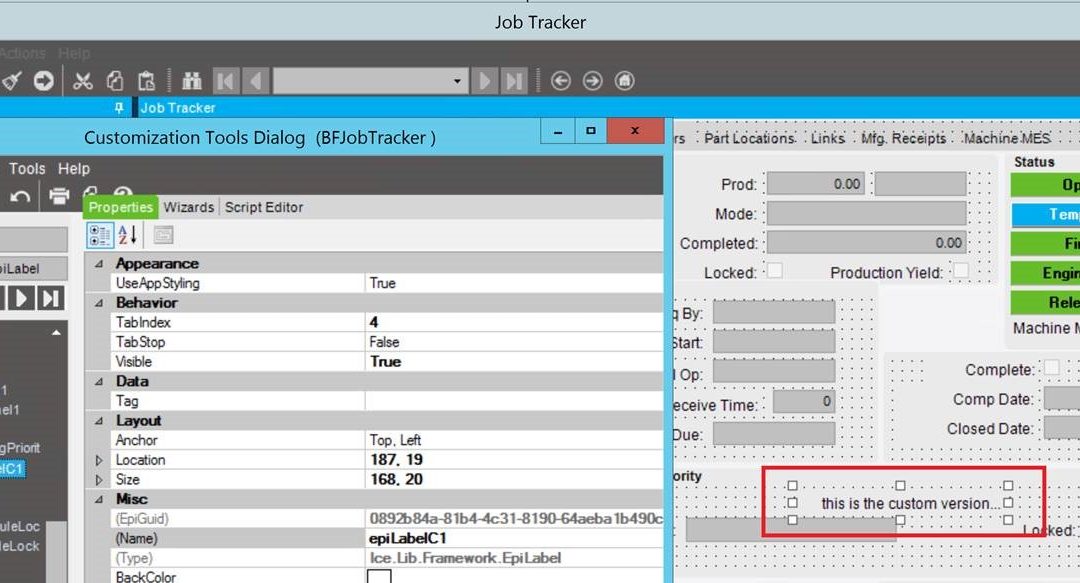
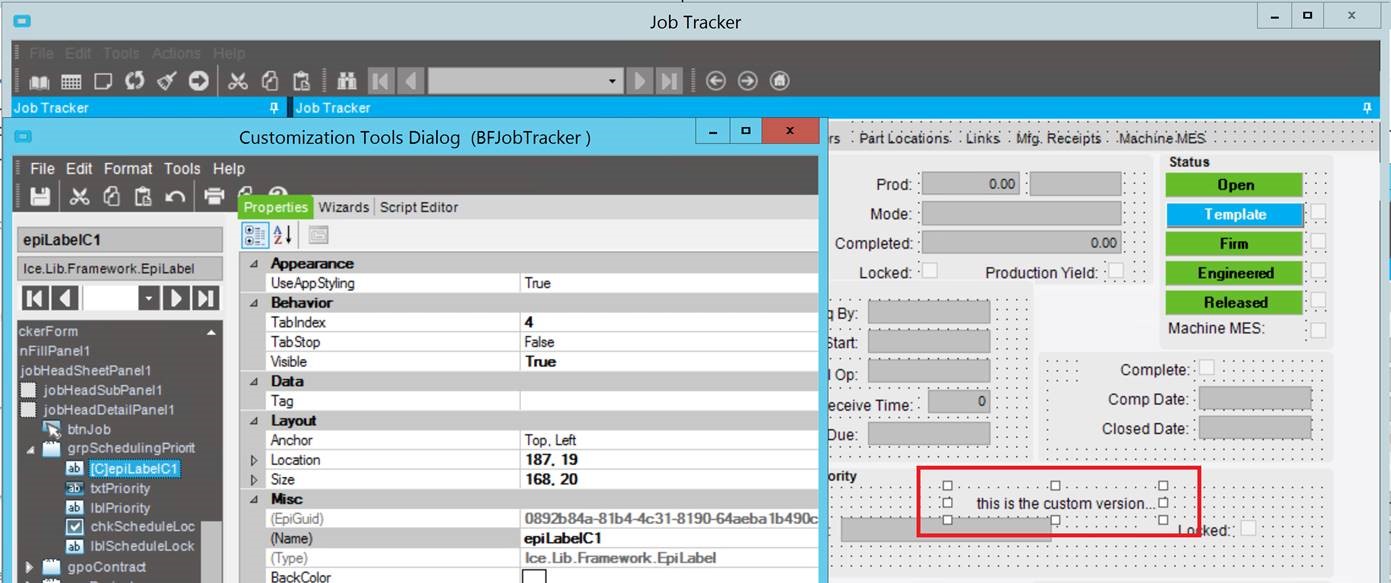
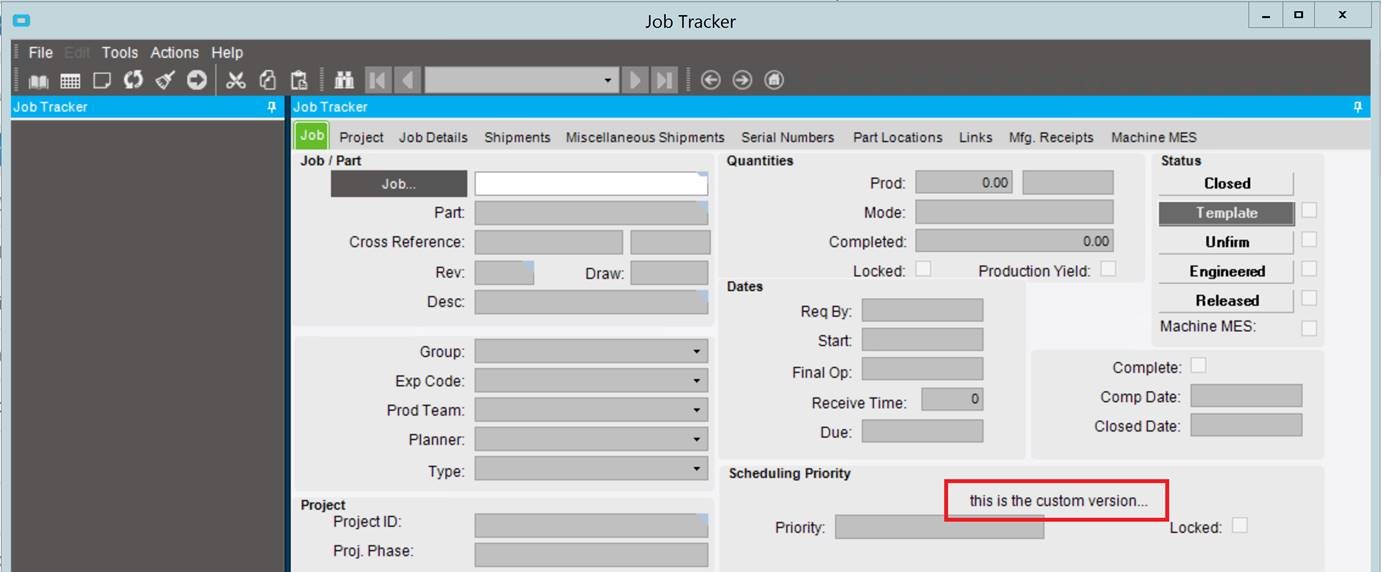
First, I created a simple customization of the Job Tracker Form: 

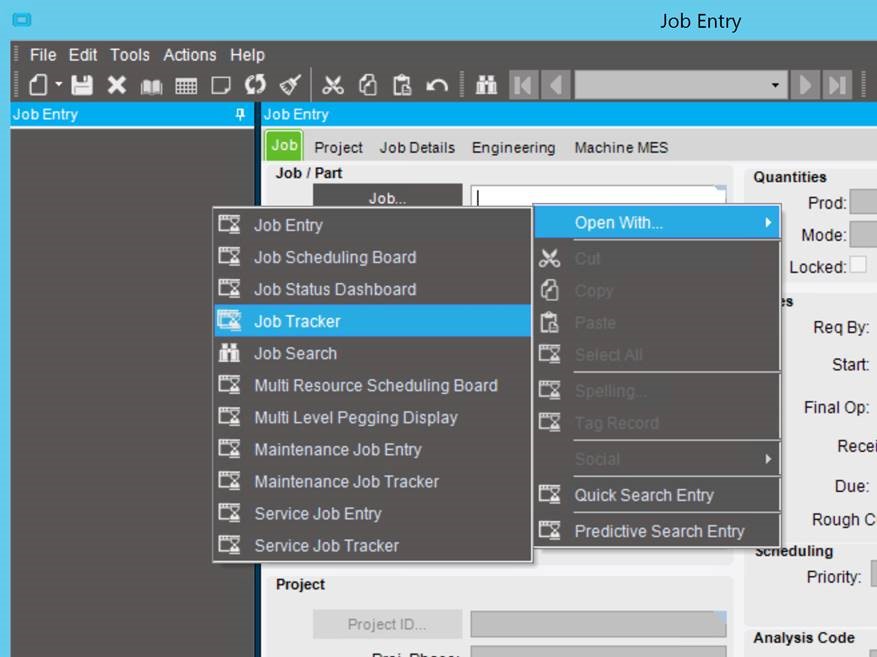
Nextwhile still in developer mode, I tried to open the Job Tracker from Job Entry, using the “Open With…” capability: 

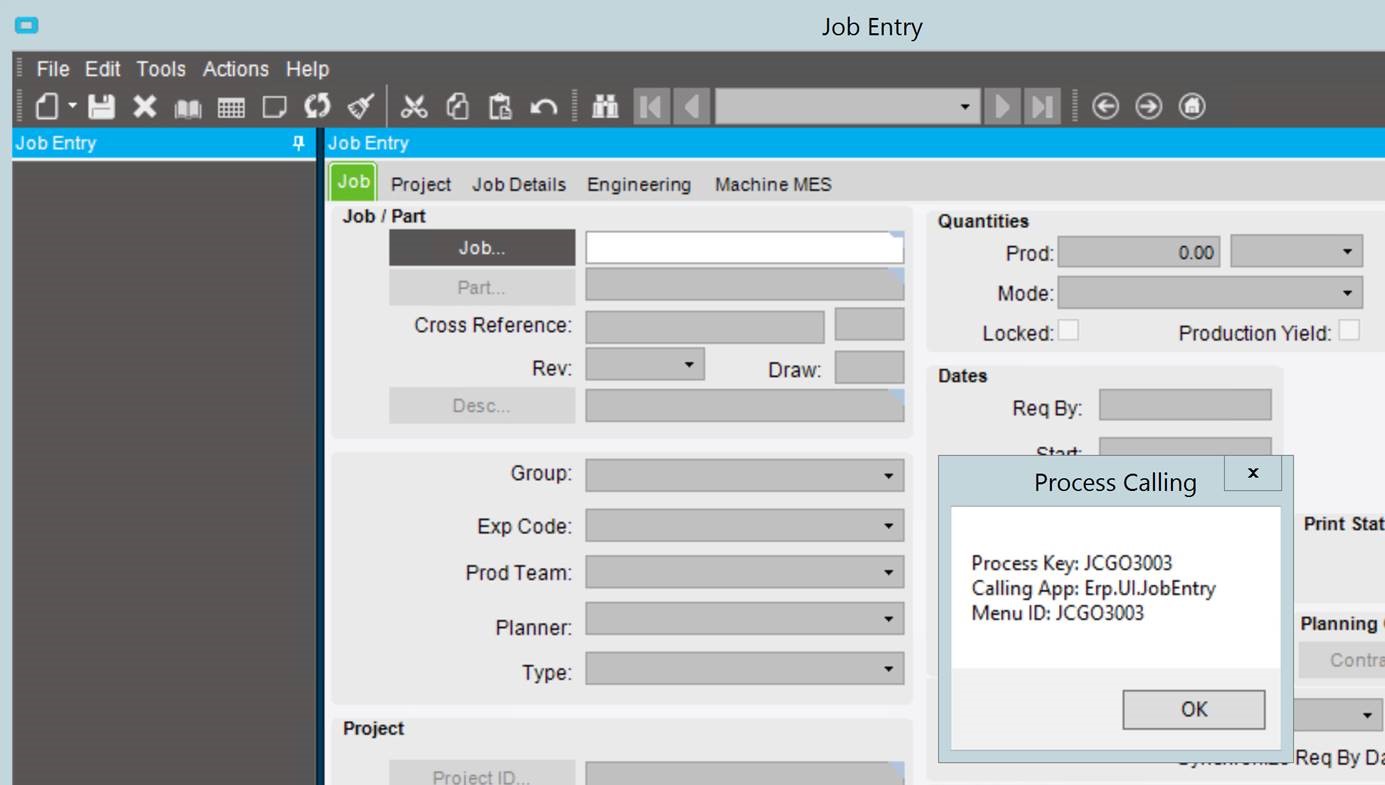
When trying to perform an “Open With…” in developer mode, the system presents the Process Calling information, which denotes the specific Menu ID (JCGO3003).  It is this menu ID that is called when performing an “Open With“: 

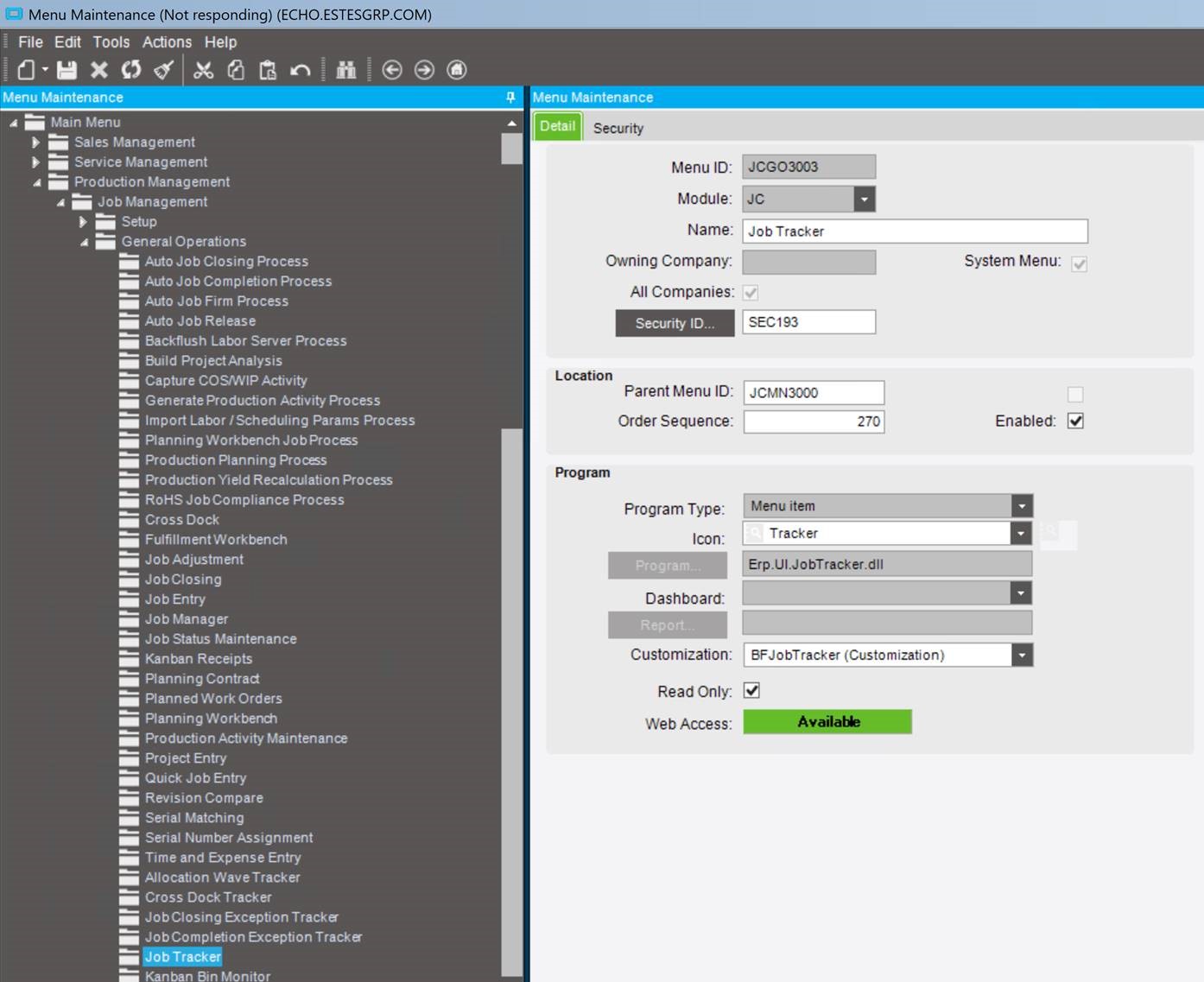
located the menu ID (JCGO3003) in menu maintenance, and bound my customization to that specific menu ID: 

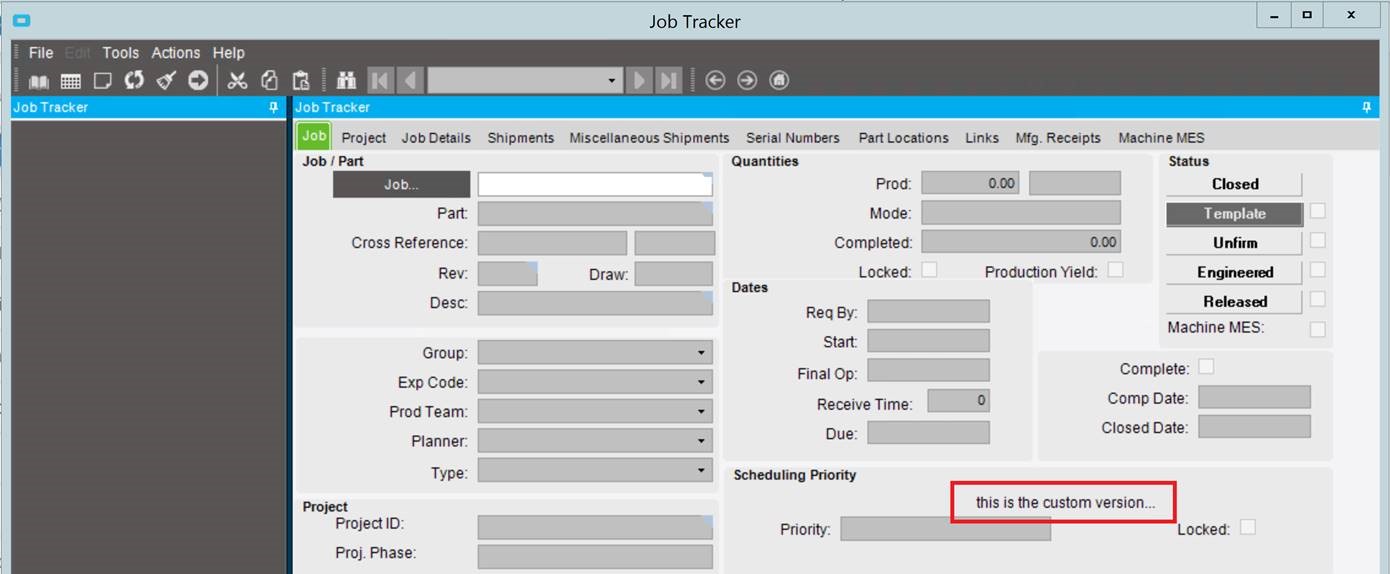
Once the customization has been bound to the primary menu ID, launching the Job Tracker from any other form (such as the Job Receipt to Inventory form)… 

…will launch the customized version of the form: 

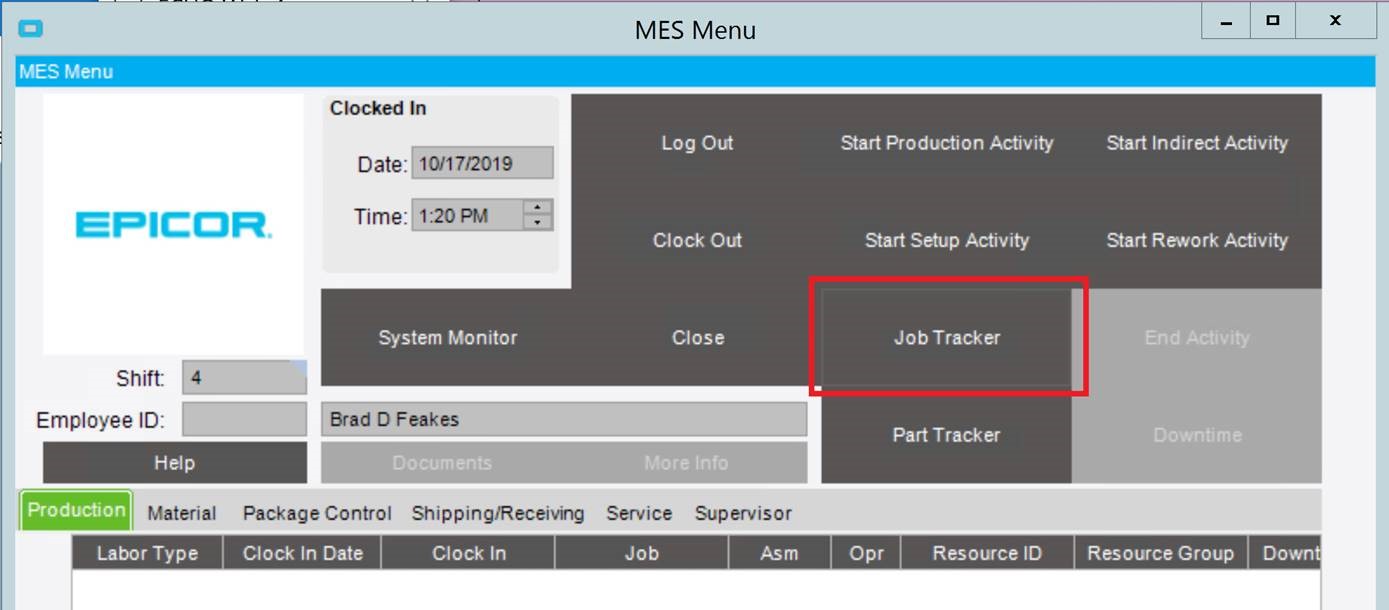
Even launching the form from MES… 

will now bring up the custom version: 

In working with our Epicor ERP hosted customers, we’ve found that the accumulation of simple adjustments, such as the one described above, can greatly improve the user experience.


Are you looking to make better use of your Epicor application?  Give us a call or let us know in the chat. We have Epicor ERP, IT & cloud experts waiting to answer your questions! 

12 Days of ECHO, Twelfth Day: My Admin Gave to Me, Ransomware 2020 the Good, Bad, and Ugly

12 Days of ECHO, Twelfth Day: My Admin Gave to Me, Ransomware 2020 the Good, Bad, and Ugly

Ransomware the hits keep coming going into 2020


By now, we’ve all heard about someone affected by ransomware. If it wasn’t a friend’s business, or a company you do business with, or the town you live in, or the hospital you visit – all you have to do is look at the news to see major enterprises being attacked and ‘taken out’ by this nefarious deed.  As long as people pay, the bad guys will keep using it as a tool. After all, they’re just chasing the money. 


So why do I title this “the good, the bad and the ugly”?  Well, if you’ve been hit, you know the bad part.  It’s expensive in both dollars and perception.  What good can come of ransomware? And besides the rising ransom amount, why is it about to get uglier! 


First, the good part.


It raises awareness that the bad guys are afoot. Wherever there’s profit, fame, political gain and more, there will be someone to play the villain (or hire them) to get the goods. Technology just made it easier. So, the good news is that you know about it!  


Second, the bad part.


Knowledge without action is a travesty. It would be even better if you acted on that knowledge and improved your defenses. Backups and disaster recovery plans are hopefully in place, but don’t assume YOUR backups and DR plans are solid.  Test them occasionally to find the problem before you need a restore. I can’t tell you how many businesses think their backups are solid to find out differently after the attack. 


Internet access should be a privilege, not a right. Virtually nobody should have unfettered access to any website they want. Users should get internet access based on their role in the company, not because they have a computer and a browser. ALL emails and internet access should be filtered, blocked, logged and if needed, analyzed. You need to be current on patches, antivirus, spam filtering, blah blah blah.  Sorry if I lost you there, but we’ve been beating that drum for years.  In fact, you might want to take away the internet from your users – let users surf only on their phones, on the guest wifi and NOT the corporate wifi.  Perhaps provide an internet kiosk that’s separate from the corporate network. 


Lastly, the ugly


The *really* ugly. Once you get ransomedyou can no longer assume that it’ll just lock your files up. That data of yours (oh, customer files, payroll info, vendor lists, etc.)  could have just as easily been copied to the attackers and then encrypted. So now, you don’t have your customer spreadsheet, but the bad guys do!  Imagine the horror when they go to all your clients to tell them you’ve been hacked and they have all this data about YOUR customers! If you are under HIPAA, you might as well close up shop, the HIPAA fines alone will knock a small practice down and out. What customer will solicit a company that not only leaked their information, but that same confidential information was POSTED on FaceBook? The depravity and damage can only be imagined at this time. 


So, if you got ransomed, and all you lost was a few (thousand) bucks, consider yourself lucky. It’s about to get a whole lot uglier.  The cities of Atlanta, Pensacola, and Baltimore will agree! 


Happy New Year to all and may 2020 be brighter, smarter and safer. 

If you liked reading the “Twelfth Day of ECHO” return to our main list to read all of the other “12 Days of ECHO” posts.


Do you have questions or need assistance with your ERP system or data security?  Please feel free to Contact Us and see if we can help get your bits and bytes in order.