
Select Page
EstesGroup Interviews Dan Aldridge: A Journey Through ERP

EstesGroup Interviews Dan Aldridge: A Journey Through ERP

Celebrating 20 Years with EstesGroup

For two decades, EstesGroup has been immersed in the world of Enterprise Resource Planning (ERP), aiding companies in harnessing technology for their organizational advancement. In honor of EstesGroup’s 20th anniversary, we embark on a series of interviews with friends and colleagues who have shared in our remarkable journey.

Dan Aldridge Interview ESTES LIVE 2024

On January 12th, Brad Feakes, President of EstesGroup, sat down with Dan Aldridge, a prominent figure in the ERP community and a burgeoning social media influencer in the realms of digital transformation, change management, and Enterprise Resource Planning.

Begin with Baan

Dan brings a unique perspective to the ERP landscape, having actively participated in ERP since the late ’90s and directly witnessing the Y2K ERP boom and its aftermath. Having gained experience with Baan’s Tier 1 ERP solution at its peak, he observed its subsequent decline and eventual integration into Infor’s comprehensive suite of ERP solutions. One could say he has witnessed it all.

Network Equals Net Worth

Dan’s career is characterized by the relationships cultivated along the journey. Colleagues from past ventures became the foundation for new endeavors. When it was time to expand the team and venture into new territories, his network provided invaluable support. Reflecting on the past, Dan finds new connections emerging based on shared business cultures that transcend their original brands.

Inbound and Outbound Strategies

In marketing and business development, Dan emphasizes the transformative power of relationships. Rather than conforming to algorithmic preferences, he advocates for informative and educational content that fosters genuine connections. “Network equals net worth” underscores the organic growth nurtured by meaningful relationships. Dan’s approach to content marketing aligns with his organizational goals while building his personal brand. In the ERP space, inbound marketing is inherently relational, focusing on solving problems and building connections that drive business growth.

Scaling, Impaling, and Prevailing

Dan’s insights into business growth and operations extend from his experiences as a business owner and a leader tasked with growing an ERP organization in the US market. Scaling organizations presents unique challenges that extend beyond implementation activities. Navigating growth requires tailored approaches in sales and marketing, particularly when transitioning from a smaller market to a larger one.

Solutions vs. Services

A notable challenge in the ERP space lies in the disparity between selling ERP solutions and selling implementation services. Selling ERP solutions emphasizes software capabilities, while selling implementation services focuses on demonstrating domain authority and expertise. As a consultant, selling services is often more straightforward due to the control over delivery, unlike the uncertainties associated with software sales.

Navigating the Future: Cloud ERP and Composable ERP

Cloud ERP dominates the horizon as on-premise models become obsolete. Dan explores the concept of Composable ERP, envisioning dynamic ERP architectures built atop legacy infrastructure without necessitating underlying system upgrades. This approach offers large organizations the flexibility to create common business processes across divisions with disparate systems, heralding a new era in ERP adaptability.

Next Steps: More EstesGroup Interviews to Come!

As the year unfolds, EstesGroup will continue celebrating its 20th anniversary by reflecting on the journey alongside the friends and colleagues who have been part of this remarkable story. We look forward to sharing more EstesGroup interviews with you along the way.

Follow Us

Watch EstesGroup Interviews on YouTube to Learn More about ERP in 2024

Unlocking Automation with SYSPRO® Business Objects

Unlocking Automation with SYSPRO® Business Objects

SYSPRO® Business Objects – The Basics

If you are looking to automate or customize data processing in SYSPRO® then business objects will be your best friend. A business object in SYSPRO® is a program that does not have any user interface. Instead, they rely on defined schemas to take in data, transact with SYSPRO®, and return status messages. Both the input and output are based on XML.

SYSPRO Business Objects Unlocking Automation

The latest versions of SYSPRO® ship with a significant list of available business objects to use. Each object serves its own purpose and can be used for specific types of transactions. They follow a similar naming convention to SYSPRO’s usual user-interface programs in the way that they all have codes. For instance, you can use SORTOI to create sales orders, APSTIN to post invoices, and INVSST to add, delete, modify stock codes.

Business objects exist to allow for safe, reliable automation of data transactions. While you may be familiar with the SYSPRO® SQL database, you should never use direct SQL to modify SYSPRO data. Business objects allow you simply choose your object based on the type of transaction you seek to perform, fill in the schema details, and let SYSPRO® perform the heavy lifting in the database to post the transaction. 

SYSPRO® 
Business Object Groups

All business objects in SYSPRO® are categorized into one of four types of objects:

  • Query – Objects intended to retrieve and query data (“Get” functions).
  • Setup – Objects used to create or modify data such as suppliers, stock codes, or customers. This type requires additional parameters to specify whether you intend to add, modify, or delete.
  • 
Transaction – Used to post transactional data to SYSPRO®. Examples such as creating sales orders, posting invoices, or receiving inventory.
  • Build – Objects that can be used to retrieve information to better build transaction-type posts.

Business Object Schemas and Sample XML Data

Business objects have a pre-defined “schema” containing the various fields and parameters that can be used in the object. Transaction and Setup type objects have an XML parameter file in addition to the XML-In data. As an example, below is the default sample schema XML for the INVTMB business object. This object is a Transaction-type object used to post bin transfer inventory movements.

INVTMB Parameter XML

SYSPRO Business Object

INVTMB Input XML

SYSPRO INVTMB Input XML

INVTMB XML Output (Sample)

SYSPRO Settings Automation

The parameter file contains “Settings” to apply for the overall transaction. While these settings vary based on the business object, common parameter tags are TransactionDate, ValidateOnly (testing only versus committing to the post), ApplyIfEntireDocumentValid (Post only if all items are valid).  Note that Query-type objects do not use parameter files and will not need parameter XML passed for them to work. 

The input XML (XML-In) is the item-specific data to supply the object. For this object, this is where we provide the stock code to transfer, source/destination bin, and the number of units to transfer. For many objects, it is possible to supply several “<item>” entries at a time to bulk-post transactions.

Each business object provides a “response” in the shape of an XML-Output file. In the case of the INVTMB object seen above, the output contains journal and key details about the successful inventory transfer. Most objects will have a summary of the transaction stating how many items succeeded and how many failed (if any). The XML-Out for Query-type objects will be the search results based on what you requested.

Licensing

All business objects are freely available for use if they are called and transacted within SYSPRO®. This means any script or program developed within SYSPRO® itself. If you intend to use a business object outside of SYSPRO®, you will have to purchase and update your licenses. Business objects are bundled together and grouped by modules so that you only pay for business objects that you need. For instance, if you intend to automate sales order-related data, you can license sales order business objects specifically.

The best place to learn and use business objects is the e.net Diagnostics tool. This is a program you can install using the Installer on either the server itself or on the client machine.  

Elevate your business to new heights with EstesGroup’s unparalleled managed IT and cloud services for SYSPRO® ERP.

Experience a transformative approach to technology management, ensuring optimal performance, security, and scalability for your operations. Our expert team at EstesGroup is dedicated to delivering tailored solutions, seamlessly integrating managed IT services and cutting-edge cloud technology. From proactive maintenance to advanced cybersecurity measures, we provide a comprehensive suite of services that empower your business to thrive in the digital era. Trust EstesGroup to be your strategic partner, guiding you towards efficiency, innovation, and sustained growth through our top-notch managed IT and cloud services.

Electronic Signatures (eSignatures) in SYSPRO

Electronic Signatures (eSignatures) in SYSPRO

A “Signature” SYSPRO Admin Tool

Electronic Signatures (also referred to as eSignatures) is one of SYSPRO’s most powerful administrative tools. It allows you to audit and monitor transactional data against any type of event you can imagine throughout SYSPRO. In addition, it also includes “trigger” features where you can have certain events execute custom scripts, send email messages, or invoke custom reports. This section of SYSPRO has several layers of functionality. Explaining it all is difficult, so we have highlighted below some of the key features that eSignatures have and how you can use them to improve your SYSPRO experience.

Signature eSignature SYSPRO Admin Manufacturing Tool

Auditing Capabilities

The most used feature of eSignatures would be the auditing capabilities that they possess. If you have used SYSPRO for a good amount of time, you may have come to find that it is hard to track down “who did what” and “when did it happen”. SYSPRO does not natively keep much information on file about who is committing changes to the system.

For instance, by default in SYSPRO, you will have a hard time figuring out who created that one purchase order, who completed that job prematurely, or who modified the price of that sales order line. eSignatures exist to solve exactly that!

In the Electronic Signatures Setup program, you can browse on any type of event across all SYSPRO modules. Against each of these specific events, you can set up access levels, custom triggers, and detail logging of key data points relating to these events when they take place throughout SYSPRO. As an example, under the “Sales Orders” module, you can add a logging condition against the “SO add sales order” transaction to keep a log of any operator who creates a sales order in SYSPRO.

Each time a sales order is created, a log entry is then stored in the database with details about who created the sales order, when they created it, and which details the sales order was created with. You can query eSignature event logs by using the eSignature Query program later for auditing purposes.

eSignatures in SYSPRO

Additionally, there are also “e.net” type transactions for the same events that track when business objects perform these events. These can be extremely helpful if your environment uses any third-party products or custom business object implementations. There are otherwise no other efficient ways in SYSPRO to monitor or track changes that are committed by business objects unless your custom integrations have been programmed to track it themselves.

SYSPRO eSignature Triggers

Triggers can be configured against an event to perform a certain action. Contrary to the logging, these are helpful if you are looking to perform an additional action when an event takes places. When setting up an eSignature Trigger, you can choose between the following trigger action types:

  • Email
  • Run a VBScript
  • Run any program
  • Run any application
  • Write to message inbox
  • Run an SRS report

You can probably already start to imagine the countless things these could be useful for. For instance, perhaps you want to receive an email whenever a new customer is created in SYSPRO. Maybe your programmer wants to run a script and perform a given activity if the event was triggered by a specific operator, roles, or group. Or maybe, you want to run an entirely custom-built program and pass it the sales order number that was just created and captured by the eSignature.

These details only scratch the surface of what is possible with eSignatures in SYSPRO. There are several additional features within this section of SYSPRO that may be worth your time to investigate and get familiar with as they can take your company’s SYSPRO experience to the next level.

Your SYSPRO Autograph

Electronic Signatures (eSignatures) emerge as a cornerstone of SYSPRO’s administrative arsenal, delivering robust functionalities to enhance the overall user experience. The auditing capabilities stand out as a pivotal feature, addressing the longstanding challenge of tracking changes within SYSPRO. By meticulously logging key data points related to various events across modules, eSignatures enable users to easily trace actions, such as the creation of purchase orders or modifications to sales order prices. The Electronic Signatures Setup program empowers users to establish access levels, custom triggers, and detailed logging, offering a comprehensive solution for auditing purposes.

Furthermore, the versatility of eSignature triggers adds another layer of efficiency, allowing users to configure actions such as sending emails, running scripts, or generating custom reports in response to specific events. As we delve into the intricacies of eSignatures, it becomes evident that the possibilities extend beyond the surface, with additional features waiting to be explored. By investing time in understanding and leveraging the full potential of eSignatures, businesses can elevate their SYSPRO experience, ushering in a new era of efficiency and control.

Connecting the Clouds: Website vs. ERP Hosting

Connecting the Clouds: Website vs. ERP Hosting

Manufacturers and distributors can benefit significantly from a Managed Services Provider (MSP) managing one website or kin websites as part of an integrated IT services, IT security, and enterprise cloud strategy. An external IT provider ensures that the world will view web-based company representation with optimal performance, scalability, and security, reduced downtime and enhanced user experience. Through robust IT security measures, a cloud provider like EstesGroup safeguards sensitive data, mitigating the risk of cyber threats. Additionally, integrating enterprise cloud solutions facilitates seamless data access, collaboration, and scalability, enabling manufacturers and distributors to focus on core business functions while staying agile and competitive in the digital landscape.

Website vs ERP Hosting

For businesses, websites serve as crucial repositories for sharing information, necessitating proper hosting and data management to connect with customers, ensure security, and facilitate growth. When exploring website hosting services and ERP hosting solutions, businesses encounter various cloud options, with managed hosting and shared hosting being the primary types. Understanding the distinctions in the website vs. ERP hosting conversation empowers businesses to make informed decisions aligning with their unique identities.

Is your website hosting forgotten data?

While your IT team is focusing on critical tasks, your website might go unnoticed, opening the path to vulnerability and chaos. In the realm of website hosting, discerning between managed hosting and shared hosting is essential. Managed hosting is ideal for businesses seeking comprehensive control and responsibility, with the service provider acting as a dedicated IT department overseeing all aspects of the website. Conversely, shared hosting accommodates businesses needing performance and security but may lack the size or budget for full-service management. Multiple businesses share resources like RAM and CPU under a shared server, potentially impacting performance during traffic surges. Managed hosting suits larger enterprises prioritizing ultimate performance and security, while shared hosting remains viable for budget-conscious smaller businesses.

Managed Hosting vs. Shared Hosting vs. Managed ERP Hosting

Businesses should consider several key differences between managed and shared hosting for websites and ERP hosting for enterprise resource planning applications. Here are a few things to keep in mind as you unravel your web of business data.

  • Resources: Managed hosting provides dedicated server resources, ensuring optimal performance, while shared hosting involves resource-sharing, potentially leading to performance issues during high traffic.
  • Customization: Managed hosting offers customized solutions, tailored to specific business needs, whereas shared hosting tends to be more one-size-fits-all.
  • Security: Managed hosting prioritizes security, protecting individual businesses, whereas shared hosting may compromise security if one business on the shared server experiences a breach.
  • Optimal Performance: Managed hosting eliminates performance issues associated with shared resources, providing consistent and optimized performance.
  • Updates: Managed hosting ensures prompt updates and security patches, while shared hosting may require businesses to schedule updates themselves.
  • Email: Both hosting types offer email services, with managed hosting providing premium plans for enhanced features.
  • Cost: Shared hosting is more affordable, making it suitable for smaller businesses with budget constraints, while managed hosting, though more expensive, offers superior performance and security.

How ERP Hosting Gets Tangled in Your Website Web

The discussion on website hosting parallels ERP hosting, where businesses can opt for a managed service provider to host their ERP software in a remote, cloud-based data center. This centralized approach provides cost-effective, secure, and scalable solutions, enabling businesses to focus on operations rather than maintaining on-premise infrastructure.

Businesses must comprehend the disparities between the many available cloud options to make informed choices for their website and ERP hosting needs. While managed hosting excels in performance, security, and support, startups or small businesses with budget constraints may consider shared hosting initially. Managed hosting proves invaluable for businesses seeking to eliminate on-premise responsibilities, allowing them to concentrate on optimization and growth.

Complex Cloud Hosting Environments

Experience seamless business operations with our fully managed ERP hosting, ensuring optimal performance, security, and scalability as we take charge of your ERP software in a secure, remote, and cloud-based environment. Ready to tackle website vs. ERP hosting? Elevate your online presence with our fully managed website hosting, where a dedicated IT team handles every aspect, providing tailored solutions for peak performance, robust security, and unmatched support. Trust EstesGroup to streamline your technology infrastructure, allowing you to focus on growth and innovation without the burden of managing complex hosting environments.

SYSPRO Error Message: Operator Already Logged In

SYSPRO Error Message: Operator Already Logged In

A warning message that most SYSPRO users will commonly see is the “Operator already logged in” prompt. Under normal circumstances, this message means exactly what it says! The operator is already signed in.

SYSPRO Error Message Operator Sign In

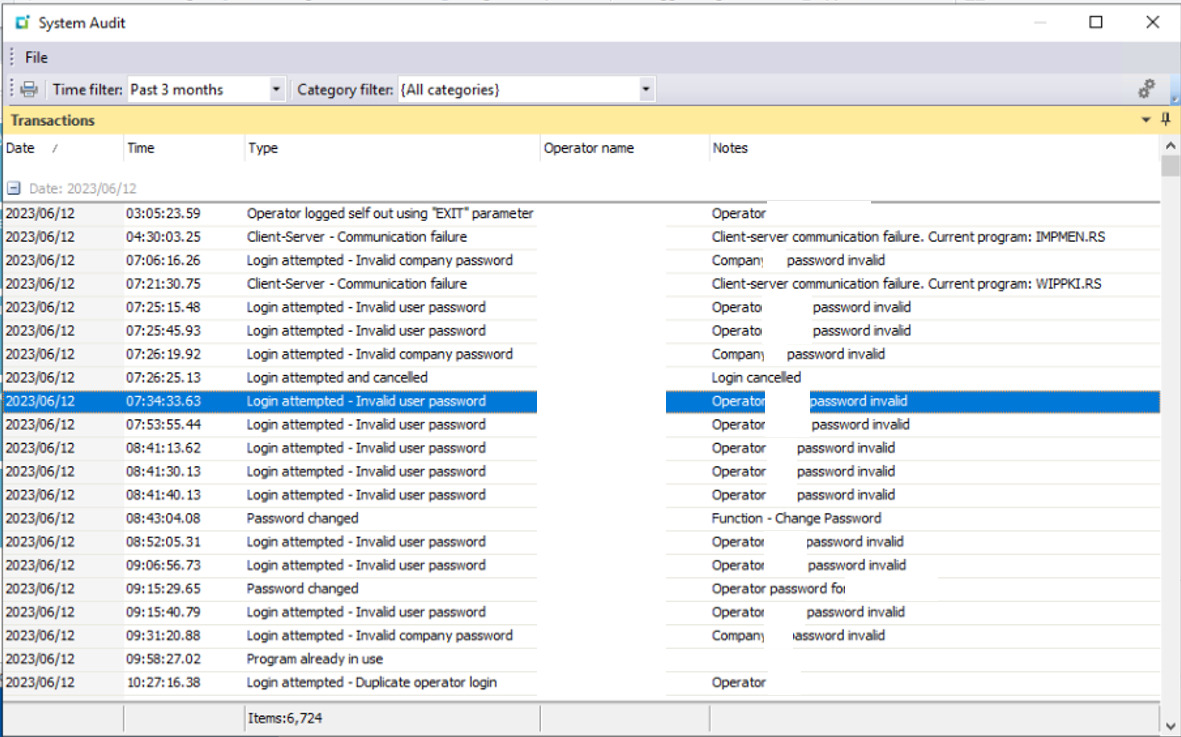
However, the error message can appear for other reasons that may be puzzling to the user. It is most typically associated with users not exiting SYSPRO through normal means (crashes, forced computer shutdown, etc). It is good for both the ERP administrator as well as the end-users to know what this error means and why it may appear despite the user not being signed in.

SYSPRO Error Message Operator Logged In

What does this “SYSPRO Error Message – Operator Already Logged In” message mean?

SYSPRO’s database has a table called AdmOperator. Inside this table there is a column used to indicate whether a SYSPRO operator is currently signed in. The column value is set to “Y” when a user signs in and is cleared when SYSPRO is closed out normally by the user. The “Y” value can linger in the database if the user fails to close out of SYSPRO “gracefully”.

In that case, the “Operator already logged in” message will appear. The user has the option to proceed which will clear any lingering operator entries. If the user is in fact already signed in, any previous session is terminated by the system.

What causes this “Operator already logged in” message?

Besides the intended circumstance of the operator already being signed in on another computer, the message also appears if a user fails to close out of SYSPRO “gracefully”. Examples of this could include:

  • The user shuts down their PC while SYSPRO was running. 
  • The user closes SYSPRO forcefully using the Windows Task Manager. This is common in the event of SYSPRO freezing or crashing. 
  • Network failures between SYSPRO and the app server causing communication errors. 
  • If the user closes their web browser when using SYSPRO Avanti without using the logout functionality in the application.

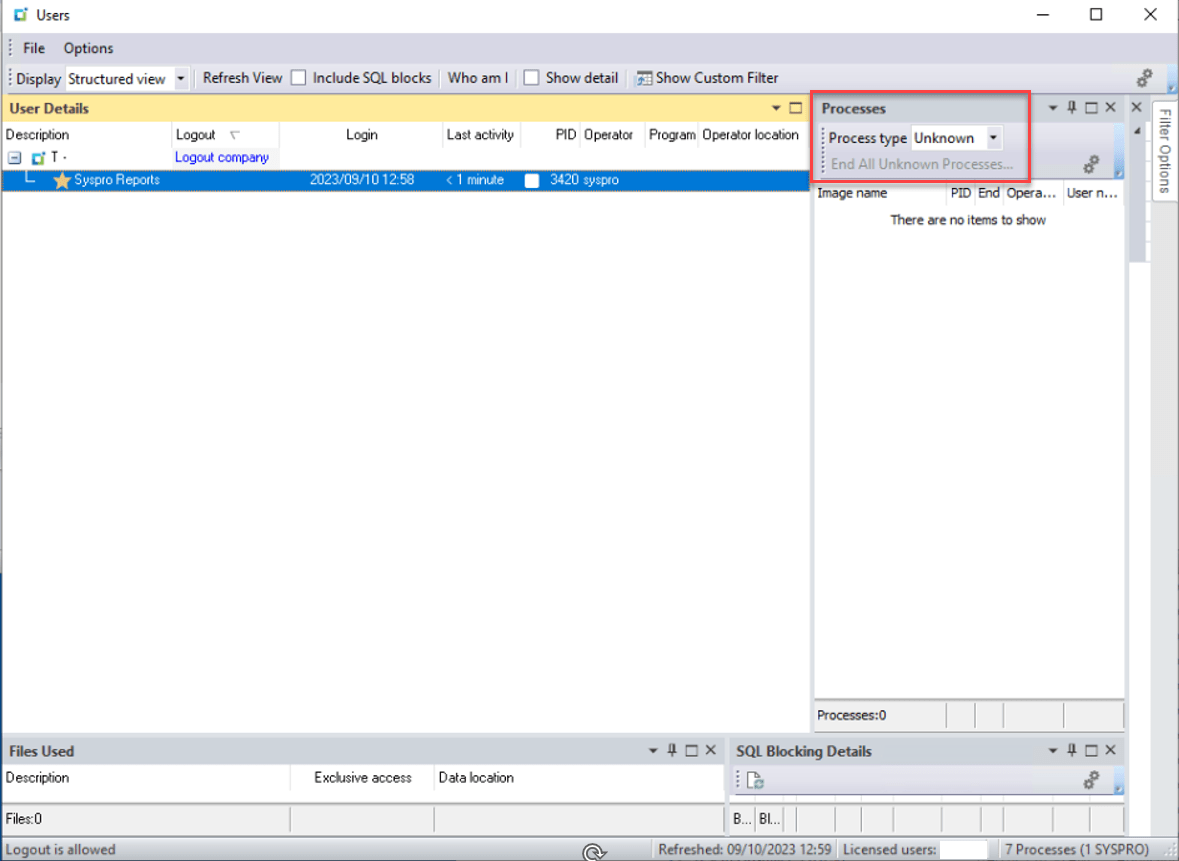
Some of these events may also result in “Unknown Processes” lingering in SYSPRO. These will have to be closed out using administrative tools in SYSPRO. To learn about these processes, see our article on Handling Unknown Processes in SYSPRO.

So, what should you do about this message?

Clicking “OK” to proceed is all you need to do! If the warning appears because the user is in fact already signed in, that previous session will simply be terminated. If it appeared for any of the other reasons outlined above, the database fields are cleaned up from any incorrect flags and reset to their intended status. It is good to inform users that this error means no harm and that they can safely proceed if they do not believe that their operator is signed in anywhere else.

Turning the Degenerative into Generative AI in ERP

Turning the Degenerative into Generative AI in ERP

Generative AI in Enterprise Resource Planning

Generative AI (GenAI) is currently revolutionizing work dynamics and interactions. Despite initial societal skepticism and perceived risks, the majority of individuals are embracing and enjoying its capabilities. GenAI holds the power to significantly enhance efficiency and streamline operations for enterprises. When seamlessly integrated into an Enterprise Resource Planning (ERP) system, GenAI can have a positive impact on overall enterprise operations and productivity.

Generative AI ERP workstation with female engineer coding

AI TriSM

For enterprises to fully leverage GenAI in their ERP systems and applications, establishing a universal level of trust and understanding is crucial. Implementing AI TriSM controls – focusing on trust, risk, security, and management – is essential to unlock the full potential of GenAI. Over the next few years, standard regulations will likely make GenAI more trustworthy and reliable. It is anticipated that organizations will incorporate TRiSM controls into their cloud and ERP system applications to minimize risk, maintain compliance, and fortify security. The capabilities and benefits of GenAI for ERP systems and applications encompass:

  • Creative Collaboration and Problem Solving
  • Elimination of Time-Consuming, Arduous Tasks
  • Improved Employee Performance
  • Increased Productivity
  • Automation of Data Processes
  • Elimination of Flawed, Irrelevant Data for Optimal Decision-Making
  • Risk Reduction
  • Heightened Security with TRiSM Controls
  • Digital Assistance and Software Innovation
  • Redefined and Enhanced Jobs with GenAI Tools

The Cloud AI Shift

Generative AI undeniably holds the potential to completely transform ERP systems, applications, and cloud management. The capabilities and benefits of this technology are clear. However, as enterprises embrace this technological shift, having a trusted guide is crucial. EstesGroup has always been your reliable source for ERP systems and cloud services.

As GenAI becomes more regulated and applicable to enterprise operations, rest assured that our company will assist you in incorporating this technology. We are committed to keeping you at the forefront of technology, innovation, and productivity. EstesGroup can also aid in employee re-skilling as roles are redefined, and we will navigate regulation and compliance to ensure optimal risk management and data security.

AI in Epicor Kinetic, Epicor Prophet 21, Sage, and SYSPRO ERP

In the realm of Enterprise Resource Planning (ERP), the integration of Artificial Intelligence (AI) holds particular importance for leading systems such as Epicor Kinetic, Epicor Prophet 21, SYSPRO ERP, and Sage ERP. These platforms stand to benefit immensely from AI advancements, enhancing their capabilities and providing tailored solutions for businesses. In Epicor Kinetic, AI can optimize supply chain management, forecast demand, and automate routine tasks, resulting in more agile and responsive operations. For Epicor Prophet 21, AI can streamline inventory management, analyze customer behaviors, and enhance order processing efficiency. In SYSPRO ERP, AI can bolster production planning, inventory optimization, and predictive maintenance, contributing to overall operational excellence. Sage ERP systems, when integrated with AI, can revolutionize financial management, automate data entry, and provide valuable insights for strategic decision-making. The synergy between AI and these ERP systems represents a pivotal leap towards efficiency, precision, and innovation in enterprise management.

The Sensitive Nature of GenAI Data in ERP

Cloud hosting in a trusted data center stands as the epitome of security for ERP systems harnessing the power of Artificial Intelligence (AI). Leveraging the advanced infrastructure and protocols of a trusted data center ensures unparalleled reliability and resilience. The redundant systems and robust architecture not only guarantee minimal downtime but also provide a secure environment crucial for the sensitive nature of ERP data. The cloud, with its scalable resources, accommodates the dynamic computing needs of AI applications, enabling seamless integration and optimal performance.

Additionally, top-tier data centers adhere to stringent security measures, incorporating advanced encryption, access controls, and continuous monitoring. This fortified combination of cloud hosting and data center standards ensures that ERP systems not only harness the transformative capabilities of AI but do so in an environment that prioritizes data integrity, confidentiality, and accessibility with the utmost diligence.